Accounts Payable Automation Software
Take control of your entire AP process with an intuitive, AI-driven solution


Accounts Payable Automation
Take control of your entire AP process with an intuitive, AI-driven solution
Cash management
without the chaos
Esker’s Accounts Payable automation software allows businesses to eliminate the pains of manual AP invoice processing with AI-driven data capture, touchless processing, and electronic workflow capabilities. The end result? A simpler, more efficient way to process invoices, manage cashflow and generate new revenue.
Esker is here to help your AP department avoid:
- Dissatisfied suppliers & AP staff
- Limited control & visibility of process
- Missed vendor discounts & late penalties
- Longer reconciliation & payment cycles

“It’s much easier to see who we’re waiting on and still has invoices to approve. Now, we can quickly look it up in Esker and know immediately who needs a reminder.”

Automation + AI
Free up your finance team with
ultimate speed & visibility
By automating the source-to-pay (S2P) cycle and utilizing the latest in AI-driven technologies, Esker frees up Finance professionals from time-consuming tasks, allowing them to be more efficient and develop new skills. Advanced capabilities such as first-time recognition, machine learning and teaching help AP departments achieve the highest possible invoice recognition rate as fast as possible in order to get a quicker ROI.

Increase AP department efficiency
Multi-channel solution
Optimize invoice management by enabling processing in any format and from any input channel, whether invoices are received by mail, email, fax, or EDI. By turning a machine-readable EDI invoice into a human-readable version, you can now apply standard AP processes to EDI invoices as well.

Accelerate closing procedures
Esker Synergy AI
Esker Synergy AI optimizes invoice data extraction by using machine learning and deep learning to accurately extract and populate into a validation form (or auto-approved when no exception is detected).

Greater agility in accounting
Predictive invoice coding
Using AI-based predictive line items to code PO and non-PO invoices (e.g., G/L account, tax code, cost type, cost center), invoice data is auto-matched with the corresponding orders and goods receipts — enabling staff to quickly review and resolve exceptions from a single, consolidated view.

Reduce invoicing costs & delays with AI technology
Touchless processing
Invoices that require payment approvals are automatically routed to the right individual or group in charge. AI technologies are working hand-in-hand to enable touchless AP processing and expedite invoice payment approvals.
Ensure secure & unified global
process management
Esker’s cloud-based AP automation software automates Finance functions and reduces operational costs by eliminating paper, transportation and physical filing. Its ease of use and customized interface maximizes user adoption, while promoting invoice visibility across all formats and reception channels, including EDI. With one process consolidating all invoices, AP departments can help streamline the S2P cycle and facilitate business growth without operational restraints.
Manage cash efficiently
One interface, multiple solutions
Esker’s offers an end-to-end S2P solution suite, which includes automated AP as well as: supplier management, contract management, procurement, expense management and payment.
Empower your team members with actionable data
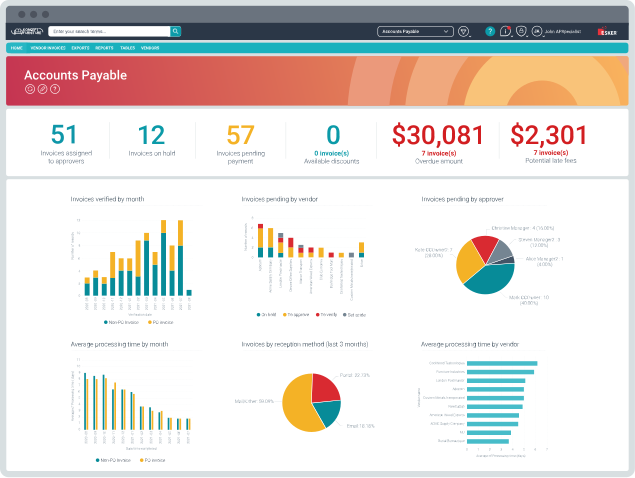
Intelligent dashboards with real-time KPIs
Allow Finance teams and AP workflow users to customize AP metrics that are displayed on their interface in easy-to-read graphs and reports. This allows every action — from performing daily tasks to monitoring budgets — to be more strategic and value-added.
Esker easily connects to all your ERPs
Multi-ERP integration
Esker can handle as many ERPs as needed within one single environment. This type of unified cloud platform means all users work in the same experience, whether you’re using one ERP or multiple systems.
Supplier efficiency & collaboration
Make your company easy
to do business with
Avoiding procurement delays requires that companies build strong partnerships with their suppliers through timely payment of invoices, rapid dispute resolution and real-time communication. Therefore, it’s necessary for buyers to consider their level of attractiveness on the supplier markets and implement a systemic approach, build loyalty, develop supplier relationships, and enrich operational and economic performance.
Esker’s Accounts Payable automation software provides a win-win situation for both sides.

Resolve issues quickly
Online supplier portal
As part of Esker’s AP automation software, a convenient online portal gives suppliers self-service access to payment information, helping them get paid quicker and reduce costs and, in turn, saving your company time and money previously allocated to responding to invoice status calls.

Optimize cash
Dynamic discounting
Allows your company to optimize cash and secure your supplier base by offering accelerated payments. Suppliers provide a discount in real-time to improve cashflow and reduce the cost of goods.

Reduce invoice-to-pay cycle time
E-payment
Users can have a 100% digitized process, from sign-off to payout. Every step and user action is recorded in the system ensuring the process is compliant and payments are timely and accurate. No more time wasted shuffling paper!

Greater visibility
Supplier statement matching
Not only ensuring that invoices are properly recorded, supplier statement matching also helps you improve on-time payment, achieve high accuracy of ledgers, reduce supplier queries and give time back to AP.
Risk management
Manage company cash from any location
Even though modernizing AP has been imperative for years, the slow adoption of automation put many organizations in a highly vulnerable position if a business disruption occurs — late or missed payments, payment fraud attacks, and difficulty staying compliant. Esker’s AP automation software minimizes these risks and enhances your company control by helping you:
Fight against APP fraud
Sis ID integration
Esker has partnered with French FinTech Sis ID to fight against authorized push payment (APP) fraud. Fully integrated with Esker’s S2P suite, Sis ID’s Sis Inside solution adds an anti-fraud shield to the user experience. Control maverick spend, reduce risks and bring visibility into spend.

Budgetary control, plus quick & easy approvals
Basic and complex workflow handling
New records are submitted to different users based on their profiles. Vendor-initiated changes trigger new approvals, reducing risk and protecting reputation.

Control your payments and alleviate operational costs
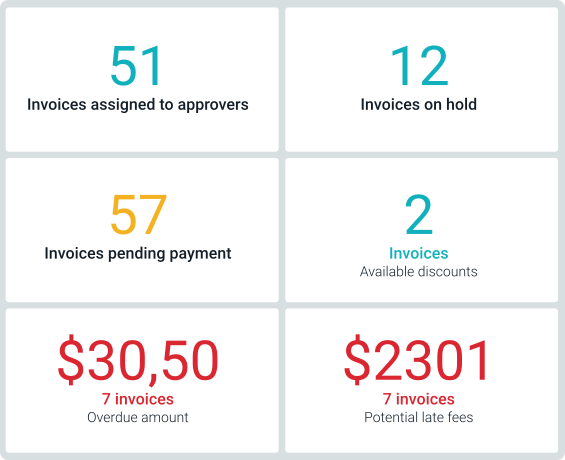
The AP Specialist dashboard
Displays the monetary value of potential late fees for invoices approaching their due date. Paying suppliers on time not only strengthens relationships with them but also helps companies reduce financial risks. Automatically match PO invoices with POs to ensure that there are no inconsistencies or risks of fraud.

Ensuring tax compliance
Esker’s AP e-invoicing solution
Delivers compliant, paperless invoice processing on a global scale. Keeping up with changing regulations is tricky and managing suppliers across borders adds even more complexity. Archived invoices are kept secure for as long as the local laws dictate.


Work smart, work mobile
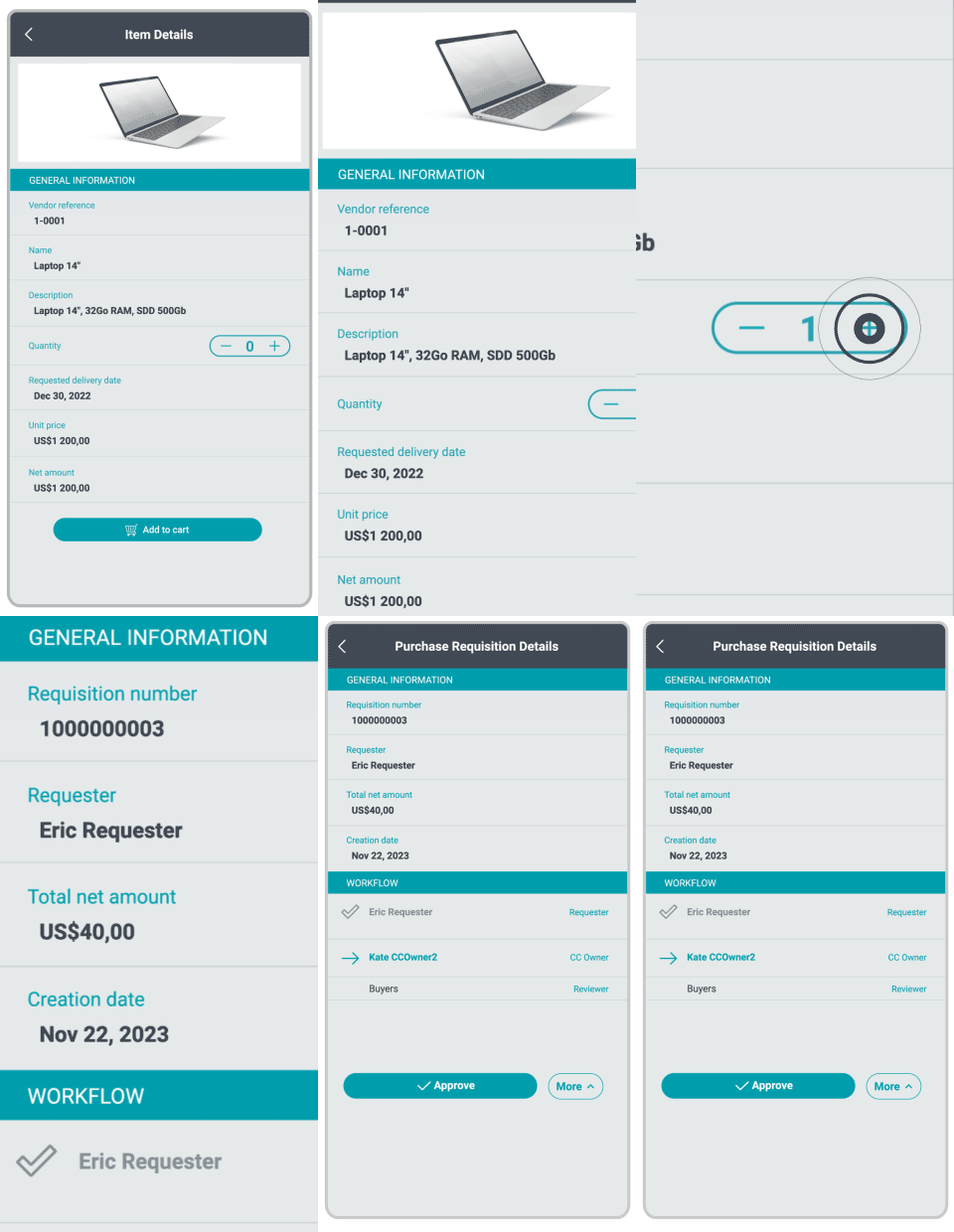
Esker’s mobile application, Esker Anywhere™, delivers faster invoice processing, improved efficiency, and on-the-road accessibility for managers who review and approve spend requests or supplier invoices prior to payment.
Thanks to mobile dashboards and metrics, managers can monitor their KPIs and business trends while on the go. The app is available for free from the Apple App Store® and Google Play™. Once installed, users can connect to the application to view invoices pending approval.

"Even if somebody is out of the office, invoice approvals can be done anytime, anywhere with Esker's mobile application."
See what our customers say on Gartner Peer Insights 
Featured content
10 AP KPIs You Should Be Measuring
Submitted by Admin_@ll_Renee on Tue, 04/19/2022 - 11:00EnglishResource Type:Description:Metrics That Impact Your AP Performance the MostPinned to Top:YesExternal URL:https://quitpaper.esker.com/ebook-ten-AP-kpis-document-library.htmlBusiness Need:Preview Image: Culture Cash Episode:
- Log in to post comments
- English, British
Automating Supplier Management: 3 ways AI tools can help lower risk & prevent fraud
Submitted by Caitlyn Riedl on Mon, 12/04/2023 - 08:36EnglishResource Type:Pinned to Top:YesExternal URL:https://quitpaper.esker.com/ebook-automating-supplier-management-source-to-pay-document-library.htmlBusiness Need:Preview Image: Take down date:Thursday, June 4, 2026Culture Cash Episode:
- Log in to post comments
The Human Side of AP: 6 ways AP automation helps your team feel better, work smarter & stay engaged
Submitted by Caitlyn Riedl on Tue, 11/28/2023 - 14:05EnglishResource Type:Pinned to Top:YesExternal URL:https://quitpaper.esker.com/ebook-the-human-side-of-accounts-payable-document-library.htmlBusiness Need:Preview Image: Take down date:Thursday, May 28, 2026Culture Cash Episode:
- Log in to post comments
Frequently asked questions
We’ve compiled answers to some of the most commonly asked questions about Esker’s Accounts Payable automation software. Have a question you can’t find the answer to? Reach out by clicking the “Get in Touch” button below.
How does an AP automation software increase employee productivity?
It’s not uncommon for AP staff members to spend much of their time on manual tasks (e.g., entering invoice data into the ERP, hunting down approvals, printing and collecting documents, etc.). AI-driven AP automation solutions takes care of all those repetitive, low-value admin activities so you don’t have to. As a result, your team is free to focus on more strategic activities that impact cash management and your supplier relationships.
What advantages will I see with an automated AP invoicing software?
Users of an AP automation solution can expect to see a number of transformational benefits following go-live. From an operational standpoint, accounts payable automation often translates to faster invoice processing times, lower costs, simplified IT environment, and enhanced visibility over invoices and closing procedures (just to name a few). For your customers and staff, it can mean greater collaboration and overall satisfaction. Lastly, for business, these solutions can ultimately lead to more business opportunities, expansion into new markets, and increased fraud prevention.
Do accounts payable software integrate with all ERPs?
Yes! To date, Esker has over 70 unique ERP or home-grown solutions. Our ERP connectivity suite also provides simultaneous integration with multiple ERPs, which simplifies diverse environments resulting from M&A activity, streamlines onboarding, and supports shared services center initiatives.
Does AP automation solutions replace my ERP system?
No! Automated AP software is not designed to replace ERPs; rather, the software works alongside whatever system or systems currently in place to fill in the manual gaps most conventional ERPs can’t handle. This helps invoices get processed faster and more accurately, while also helping your company maximize its ERP investment.
Our partners
- Coming Soon